Connected Systems
Make your systems work together.
Your business relies on different tools to manage customers, payments, documents, and everyday operations. I connect those tools, automate repetitive work, and build what's missing to create systems that fit the way your business actually operates.
Start a conversation →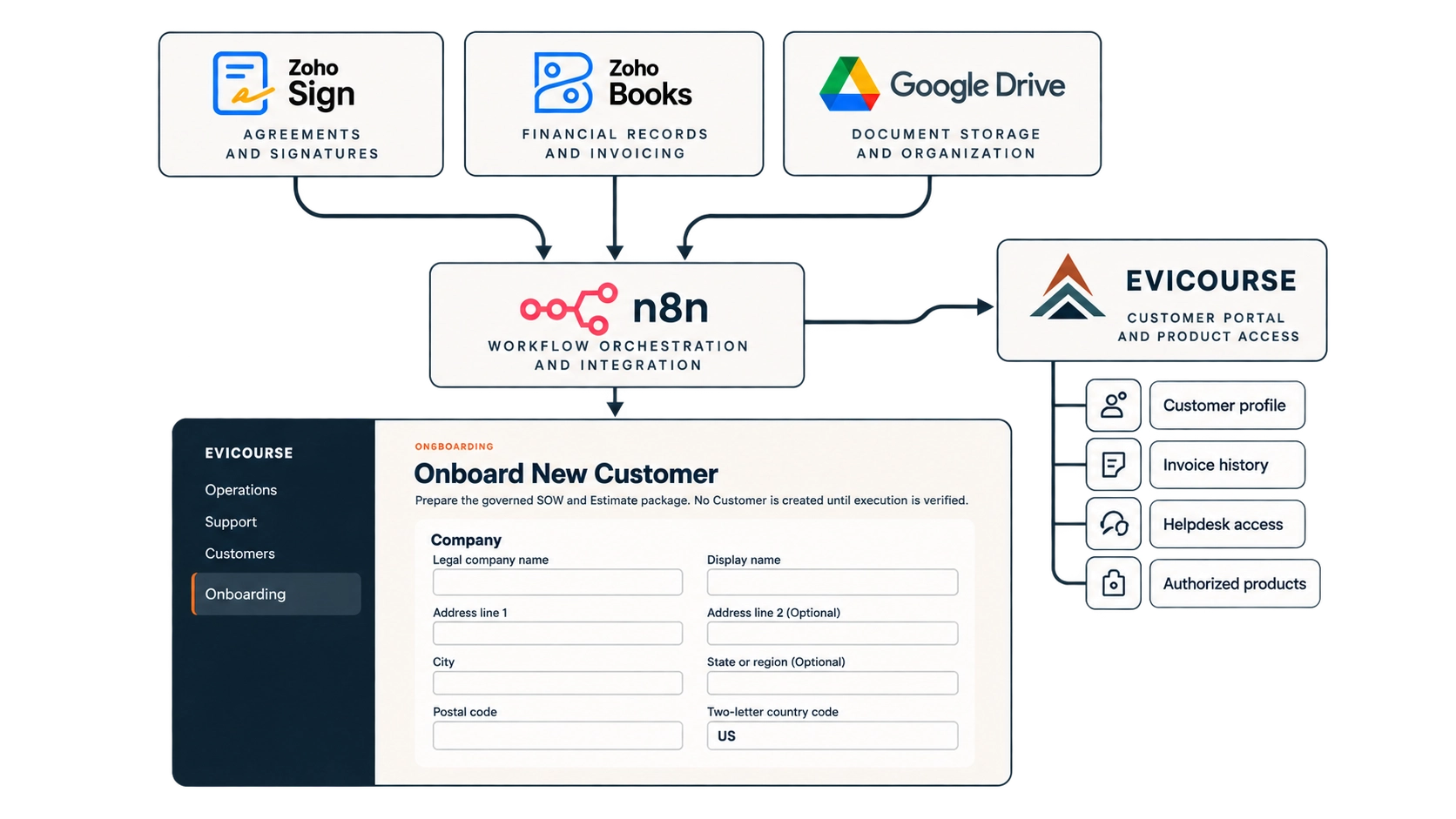
01 / The Challenge
Too many tools. Too much manual work.
Running a business often means juggling multiple applications that don't communicate with one another. Customer information gets entered twice, documents move between platforms, and simple processes require unnecessary steps.
The goal isn't to replace everything you use. It's to make the tools you already have work better together.
- Duplicate information
- The same details entered across multiple applications.
- Repetitive tasks
- Routine processes that still require manual attention.
- Disconnected systems
- Important information scattered across different tools.
02 / The Approach
Built around your workflow. Not the other way around.
Every business operates differently. I start by understanding how your work gets done, then identify where existing tools can be connected, repetitive steps automated, or custom functionality introduced.
Understand
Look at your existing workflow, the tools involved, and where unnecessary work happens.
Connect
Bring your existing applications together so information moves where it's needed.
Build and automate
Create missing functionality and automate predictable tasks while keeping important decisions under your control.
03 / Real-World Application
From signed agreement to customer onboarding.
A completed agreement can set several business processes in motion. Rather than manually creating customer records, organizing documents, and preparing billing information across separate applications, a connected workflow can coordinate those steps.
This example illustrates how separate systems can support one coordinated process. The individual tools remain useful, but the connections between them reduce the need to repeat work.
Example workflow: Agreement completion → Customer records → Billing preparation → Document storage → Customer portal access.
- Zoho Sign
- Zoho Books
- Google Drive
- Evicourse Accounts
- n8n
04 / Custom Functionality
When existing software doesn't fit, build what does.
Not every business needs another subscription or a separate platform. Sometimes the better solution is to extend an existing website or application with functionality designed for a specific workflow.
For James L Photography, a custom WordPress booking system brings event registration, checkout, scheduling, and booking administration into the existing website. The experience is designed around the business rather than forcing it into a generic booking platform.
Explore WordPress Plugins →05 / The Possibilities
What could your systems do together?
Connected systems can support many parts of a business. The right solution depends on what you're trying to improve, not how many tools you can connect.
- Customer Management
- Keep customer information coordinated across the tools you use.
- Agreements & Documents
- Connect approvals, signatures, and document organization.
- Payments & Billing
- Reduce manual steps between transactions and financial records.
- Scheduling & Bookings
- Coordinate appointments, availability, and confirmations.
- Customer Support
- Route incoming requests and track work through completion.
- Workflow Automation
- Connect routine steps while retaining human oversight where needed.
06 / Start a Conversation
Let's make your systems work better together.
Tell me how your business operates and where things get complicated. We'll explore what can be connected, simplified, or built to fit.
Start a conversation →